Collaborative Editing
The collaborative editing feature allows multiple users to edit the same document simultaneously. Document content is transmitted to the server in real time and can be stored directly on the server, eliminating the need for clients to initiate manual save requests.
Collaborative editing requires server-side support from Umo Editor Server, although you may also configure your own provider.
Effect Screenshot
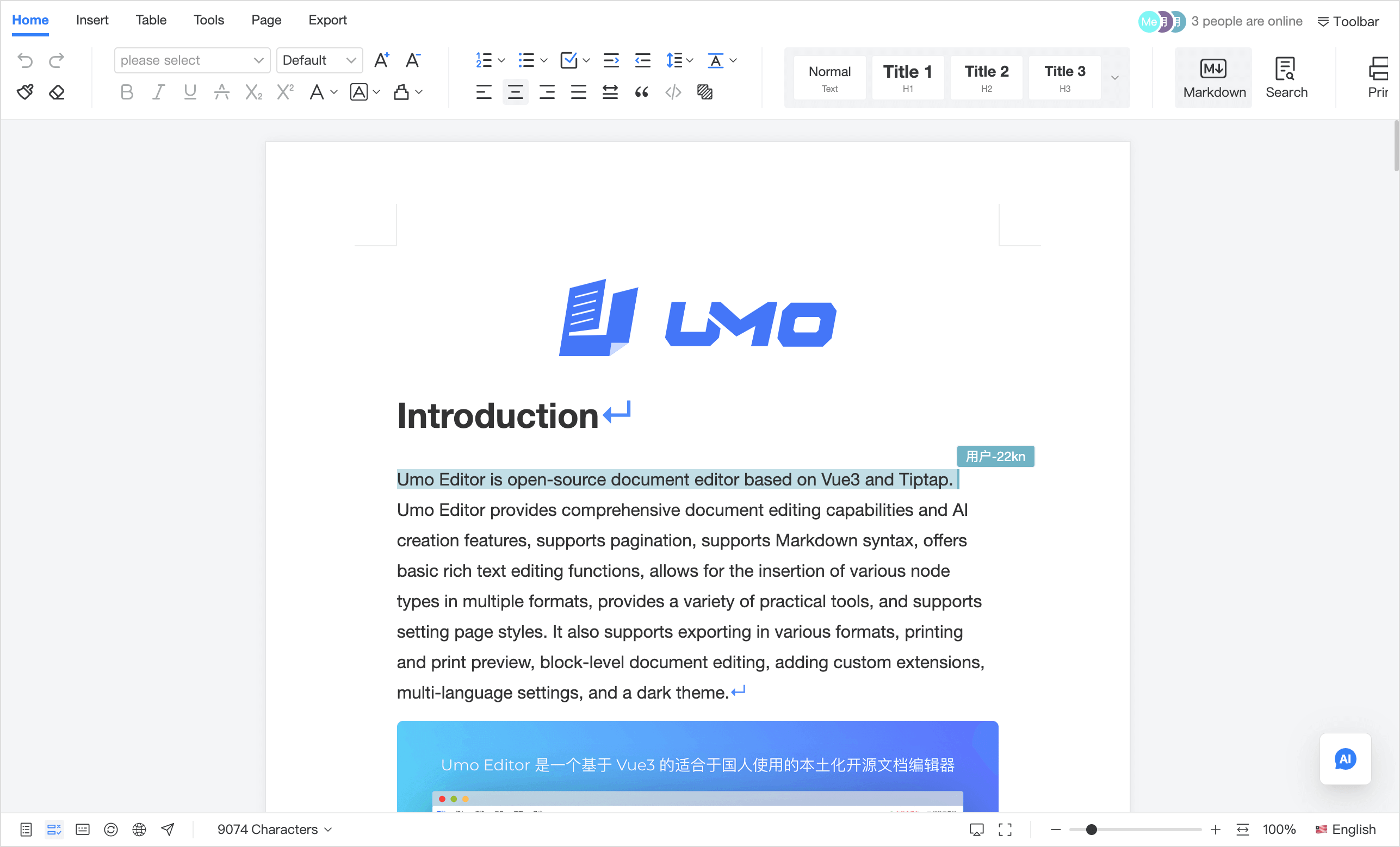
Demo Video
Features and Advantages
- Support for private deployment, allowing you to deploy privately or customize service providers to ensure data security and controllability;
- Real-time offline and online collaboration, supporting synchronization of document changes even when users reconnect after being offline;
- Real-time communication with the server through WebSocket to achieve instant document content synchronization;
- Communication with other applications through Webhook to synchronize document content, comments, and other information;
- Support for document comment collaboration, where users can comment on documents with real-time synchronization to the server;
- Umo Editor Server supports 100,000+ users editing simultaneously, enabling efficient multi-user collaboration with cluster deployment support.
Use Cases
- Co-author meeting notes: the host outlines the structure, attendees fill in key points
- PRD/spec reviews: edit while discussing to reduce copy/paste across versions
- Contract/policy drafting: multiple roles edit in parallel and converge in a single source of truth
- Papers and reports: divide sections and keep formatting and TOC consistent
- Marketing copy: iterate wording and layout together and publish faster
- Pre-sales proposals: sales, product, and delivery teams contribute sections and assets
- Training materials: instructors and TAs refine examples and exercises collaboratively
- Distributed weekly reports: remote teams update progress and risks in real time
- Support/knowledge base: keep FAQ up to date and reduce edit conflicts
- Policy updates: continuously iterate the same document with an auditable collaboration trail
Works Well With
Comments
- Collaboration is for co-editing; comments are for discussion and decisions: Comments
- Use @mentions to route questions to the right owner and track resolution
Track Changes
- Enable Track Changes during collaboration to review “who changed what”, then accept/reject to finalize: Track Changes
- Filter by author during review to converge by role
Version History
- Use versions for milestones while collaboration covers day-to-day editing: Version History
- Create versions for approvals/releases to make rollback and comparison easy
Document Forms
- Teams can collaboratively design form templates, or co-complete business fields on top of prefilled values: Document Forms
- For document-centric data entry scenarios such as approvals, registrations, and medical records, collaboration and document forms work especially well together
AI
- Use AI to polish/rewrite/expand a section and write the result back into the shared doc: AI
- Use comments to discuss AI suggestions, then apply the final edits in the document
Default Configuration
const defaultOptions = {
  // Collaborative editing configuration
  document: {
    id: '', // In multi-user collaboration scenarios, document ID is required to uniquely identify a document
  },
  collaboration: {
    enabled: false,
    showLoading: true,
    provider: {},
  },
  onCollaborationEvent(name, payload, context) {
    console.log('onCollaborationEvent', { name, payload, context })
  },
}
Unsupported Configurations
When online collaboration is enabled, the following configurations are not supported:
const defaultOptions = {
  document: {
    content: '',
    autoSave: {
      // ...
    },
  },
  onSave() {
    // ...
  },
}
This is because in collaborative scenarios, document content is transmitted to the server in real time and can be stored directly on the server, removing the need for the client to trigger save requests.
Configuration Description
collaboration
Configuration related to collaborative editing. For implementation principles and mechanisms, refer to: https://tiptap.dev/docs/hocuspocus.
collaboration.enabled
Description: Whether to enable online collaboration.
Type: Boolean
collaboration.provider
Description: Configuration of the collaboration service provider. Umo Editor Next provides a default Node.js server-side solution based on Express, which includes a built-in Hocuspocus Server (see: Umo Editor Server). This option supports all configuration options of the Hocuspocus Server.
Type: Object
Configuration: Options follow the Hocuspocus Server configuration, see: https://tiptap.dev/docs/hocuspocus/provider/configuration.
collaboration.showLoading
Description: Whether to show the first-sync loading state for collaboration. When enabled, a loading overlay is displayed and the editor is temporarily switched to read-only while document content is not yet available. The loading overlay is removed automatically once the initial remote sync completes, or once local cache is restored when collaboration.provider.enableIndexedDB is enabled. Added in v13.0.2
Type: Boolean
Default Value: true
collaboration.provider.enableIndexedDB
Description: Whether to enable offline storage for collaboration. When enabled, previously cached documents can be restored from local storage on the next visit. If the local cache is restored successfully, the editor is no longer blocked by the first-sync loading overlay even when the remote server is temporarily unavailable. Added in v13.0.0
Type: Boolean
Default Value: false
onCollaborationEvent
Description: Listen to collaboration provider events through a single callback. This hook runs after the internal collaboration state is updated, making it suitable for business logging, connection indicators, analytics, or custom error handling. Added in v13.0.2
Type: Function
Parameters:
name: String, the event name.payload: Any, the original event payload.context: Object, the current collaboration context, includingprovider,editor, andcollaboration.
Example:
const options = {
  collaboration: {
    enabled: true,
    provider: {
      parameters: {
        documentId: '1',
      },
    },
  },
  onCollaborationEvent(name, payload, context) {
    console.log('onCollaborationEvent', {
      name,
      payload,
      provider: context.provider,
      loading: context.collaboration?.loading,
      synced: context.collaboration?.synced,
    })
  },
}
Supported Events:
open: Fired when the WebSocket connection is created.connect: Fired when the provider successfully connects to the server.authenticated: Fired when the client is authenticated successfully.authenticationFailed: Fired when client authentication fails.status: Fired when the connection status changes.message: Fired when an incoming message is received.outgoingMessage: Fired when a message is about to be sent to the server.synced: Fired when the Y.js document completes its initial sync.close: Fired when the WebSocket connection is closed.disconnect: Fired when the provider disconnects.destroy: Fired when the provider is about to be destroyed.awarenessUpdate: Fired when awareness data is updated.awarenessChange: Fired when awareness state changes.stateless: Fired when a stateless message is received.
Method List
For examples of method usage, see: Method List.
getCollaboration
Description: Retrieves information related to online collaboration.
Parameters: None
Return Value: Object or undefined. The returned object contains the following information:
connect: Boolean — whether the connection to the provider was successful.users: Array — the list of users currently collaborating on the document.loading: Boolean — whether the collaboration is still in the initial sync phase. Whencollaboration.showLoading !== falseand this value istrue, the editor shows a loading overlay and is temporarily switched to read-only to prevent accidental actions. Added in v13.0.2synced: Boolean — whether collaboration data has completed the initial sync. Added in v13.0.2localReady: Boolean — whether the local IndexedDB cache has been restored. Whencollaboration.provider.enableIndexedDBis enabled and this value istrue, local cached content is available. Added in v13.0.2connectionFailed: Boolean — whether the collaboration connection failed during the initial loading phase. When this value istrueand no local cache is available yet, the editor shows a “Not connected to the server” message. Added in v13.0.2provider: Object — the service provider information. With this information, you can listen to relevant events to implement custom features. See: https://tiptap.dev/docs/hocuspocus/provider/events#option-2-binding.