Document Comments
The document comment feature allows users to add comments within a document, and supports commenting during collaborative editing sessions.
Effect Screenshot
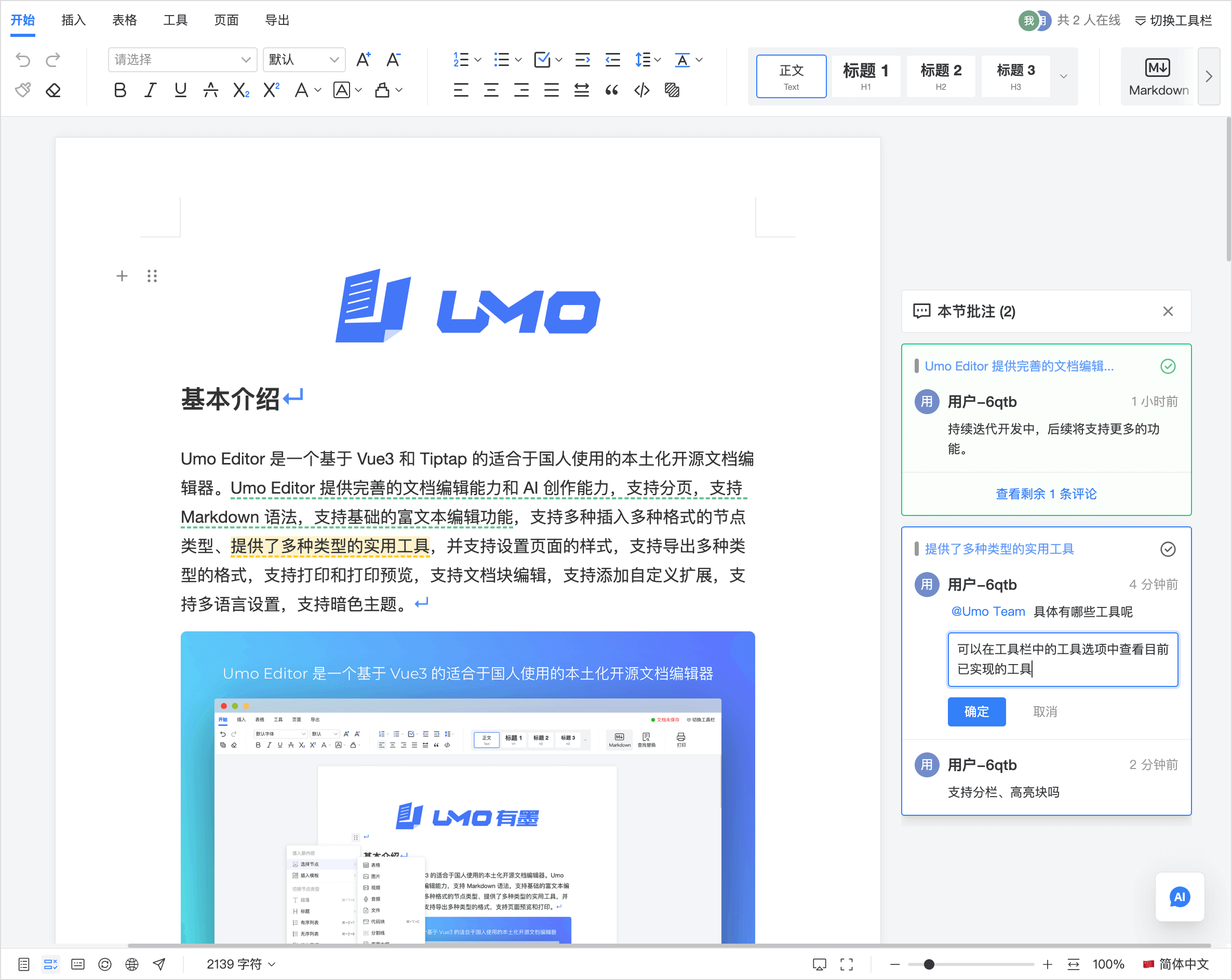
Demo Video
Features and Advantages
- Support for private deployment, allowing you to ensure data security and controllability through private deployment;
- Support for online collaboration, enabling you to add comments during collaborative editing sessions;
- Support for offline commenting, allowing you to add comments while offline, which automatically sync to the server upon reconnection;
- Support for adding comments to various node types and inline elements, enabling you to add and manage different types of comments in the document;
- Support for @ mentions in comments, allowing you to mention other users for notifications;
- Support for marking comments as complete/incomplete, editing, or deleting comments within comment threads;
- Support for replying to comments within comment threads;
- Support for adding custom data to comments.
Use Cases
- Reviews and acceptance: propose changes on a paragraph and track whether it’s addressed
- Collaborative writing: discuss without inserting explanatory text into the body
- Contract/policy review: raise questions and risks clause by clause
- Document QA: flag structure issues in TOC, tables, images, footnotes, and more
- Teaching and coaching: leave point-by-point feedback with full traceability
- Requirements review log: keep decisions in threads for later audit
- Compliance checks: review sensitive wording, disclaimers, and legal statements
- Support/knowledge base maintenance: tag outdated content and assign an owner
- Meeting minutes confirmation: @mention owners to confirm key actions and responsibilities
- AI draft review: mark issues in AI-generated paragraphs and request revisions
Works Well With
Collaboration
- Keep discussion and editing decoupled while multiple people work in parallel: Collaborative Editing
- Threads sync across collaborators to avoid “only visible on one client” silos
Track Changes
- Use comments for discussion and decisions, and Track Changes for the actual edits and finalization: Track Changes
- Converge by resolving comment threads first, then accept/reject changes to finalize
Document Export
- When exporting to Word, you can optionally include comments, which is useful for review drafts with feedback: Document Export
- Exported Word files preserve the comment and reply relationships within a thread for continued review
Document Forms
- Use comment threads to discuss filling instructions, exceptions, approval notes, and other form-related issues: Document Forms
- When saving a document, comments and form data can also be collected together through
onSave, which is useful for approval and review workflows around forms
Version History
- Create versions at key milestones and keep comments as part of the review record: Version History
- Use comment context to understand “why it changed” when comparing versions
AI
- Generate a draft with AI, review it in comment threads, then apply the final edits via AI or manually: AI
Core Concepts
Thread: In the document commenting feature, a thread represents a group of comment messages associated with a specific position in the document. A thread may contain multiple comments along with metadata such as creation time and ID. A thread is bound to a specific range in the document. Each individual comment is part of a thread.
Comment: A single comment within a thread.
Example: A typical comment thread example is as follows:
{
  id: '7ihgradlfp',
  data: {
    user: { id: 'c6x2', name: 'User-c6x2', color: '#7fe67f' },
    ref: 'Quoted text',
  },
  comments: [
    {
      id: 'wls7unwl2t',
      data: {
        user: { id: 'c6x2', name: 'User-c6x2', color: '#7fe67f' }
      },
      content: '<p>This is a comment message</p>',
      createdAt: '2025-04-14T06:37:12.835Z',
    },
    {
      id: 'v9eabcjenh',
      data: {
        user: { id: 'c6x2', name: 'User-c6x2', color: '#7fe67f' },
        replyId: 'wls7unwl2t',
      },
      content: '<p>This is a reply message</p>',
      createdAt: '2025-04-14T06:37:30.035Z',
    },
  ],
  createdAt: '2025-04-14T06:37:12.833Z',
}
Interface Definition: The interfaces for thread and comment are defined as follows:
// Thread interface, contains metadata and a list of comments
interface Thread {
  id: string // Unique identifier for the thread
  data: any
  comments: Comment[] // List of comments in the thread
  createdAt: string // Creation timestamp
  updatedAt?: string // Update timestamp
  resolvedAt?: string // Resolution timestamp
}

// Comment interface, contains metadata and content
interface Comment {
  id: string // Unique identifier for the comment
  data: any
  content: string // Comment content
  createdAt: string // Creation timestamp
  updatedAt?: string // Update timestamp
}
Default Configuration
const defaultOptions = {
  // Comment-related configuration
  comments: {
    enabled: false,
    threads: [],
    onGetThreads: undefined,
    onSetThread: undefined,
    onCreateThread: undefined,
    onUpdateThread: undefined,
    onDeleteThread: undefined,
    onCreateComment: undefined,
    onUpdateComment: undefined,
    onDeleteComment: undefined,
  },
}
Starting from v10, Umo Editor Next’s document save option onSave method includes an additional comments parameter, which is used to save comment threads.
If document forms are enabled at the same time, onSave will also append a fifth parameter, form, which is used to collect the current structured form data.
See the onSave method in Document Save Options.
Below is a simple example of an onSave method:
const onSave = async (content, page, document, comments, form) => {
  // Save the document and comment threads to localStorage
  localStorage.setItem('document.content', content)
  localStorage.setItem('document.comments', JSON.stringify(comments))

  // Simulate a save delay
  return new Promise((resolve) => {
    setTimeout(() => {
      console.log('onSave', { content, page, document, comments, form })
      resolve('Operation successful')
    }, 1000)
  })
}
Configuration Details
comments
Comment-related configuration.
-
comments.enabled
Description: Whether to enable the commenting feature
Type: Boolean
Default:true -
comments.threads
Description: Initial comment threads.
Note: When collaborative editing is enabled, this option is ignored; the thread list will be fetched from the provider.
Type:Array
Default:[] -
comments.onGetThreads
Description: Callback function for creating comment threads.
Type:Function
Parameters: None
Default:undefined -
comments.onSetThread
Description: Callback function for setting comment threads.
Type:Function
Parameters:thread— the newly created thread
Default:undefined -
comments.onUpdateThread
Description: Callback function for updating comment threads.
Type:Function
Parameters:thread— the updated thread
Default:undefined -
comments.onDeleteThread
Description: Callback function for deleting comment threads.
Type:Function
Parameters:threadId— the ID of the deleted thread
Default:undefined -
comments.onCreateComment
Description: Callback function for creating comments.
Type:Function
Parameters:comment— the newly created comment
Default:undefined -
comments.onUpdateComment
Description: Callback function for updating comments.
Type:Function
Parameters:comment— the updated comment
Default:undefined -
comments.onDeleteComment
Description: Callback function for deleting comments.
Type:Function
Parameters:{ threadId, commentId }— the thread ID and comment ID of the deleted comment
Default:undefined
Method List
For examples of method usage, see: Method List
getComments
Description: Retrieves comment-related information.
When collaborative editing is enabled, you can also obtain the provider via getCollaboration, and use it to manage comments—this requires deeper understanding of Hocuspocus.
Parameters: None
Returns: Object or undefined, with the following structure:
connect: Boolean — whether connected to the providerthreads: Array — list of comment threads in the current document
Theme Customization
CSS Variables
You can customize the style of comments using the following CSS variables:
--umo-thread-background: #ffcc00;
--umo-thread-hover-background: #ffcc0040;
--umo-thread-inline-background: #ffcc00;
--umo-thread-resolved-background: #63c493;
--umo-thread-resolved-hover-background: #63c49340;