AI Document Assistant
The AI Document Assistant is an intelligent interaction feature designed for document editing scenarios, helping users handle document content efficiently. It supports all document node types, enabling fast creation, editing, and optimization of content such as text, images, tables, and code blocks.
It supports common editing operations based on selected text or context—continuation, rewrite, expansion, abbreviation, polishing, proofreading, translation, and more. With a configurable command system, it can accurately convey user intent to the model and generate results that match the current language and formatting requirements.
This is the entry point for “editing output”: generate content around the current selection/cursor context that can be written back directly, and provide actions like replace/insert. It works well for writing assistance, content optimization, and multi-language processing, significantly improving editing efficiency and content quality.
Before integrating, read Getting Started.
Screenshots
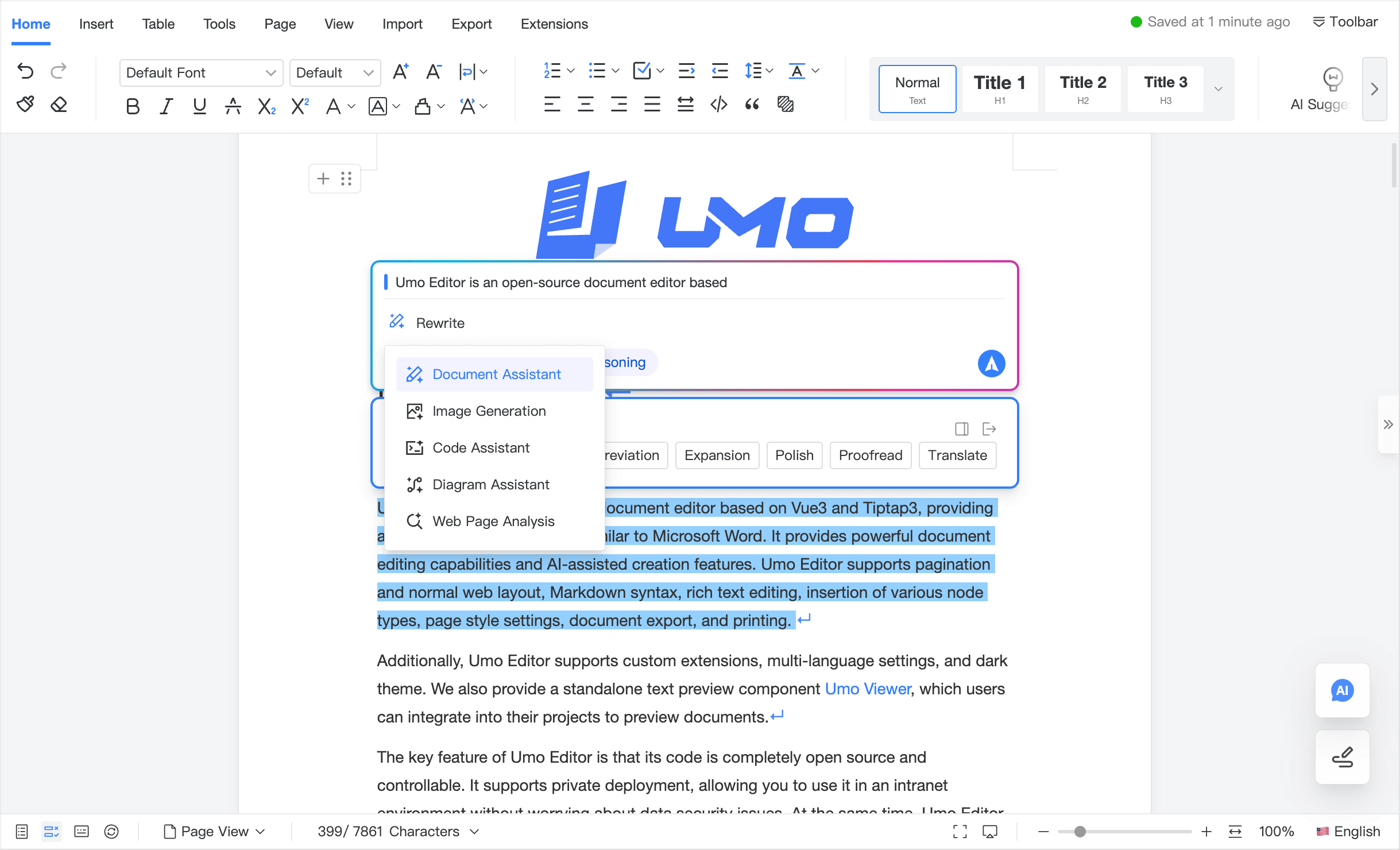
Default configuration
// AI Document Assistant default configuration
const defaultOptions = {
  ai: {
    assistant: {
      enabled: false,
    },
  },
}
Configuration reference
This page only covers options under options.ai.assistant. For shared options (such as ai.models and ai.callbacks), see Configuration & Methods.
ai.assistant.enabled
Description: Enable/disable the AI Document Assistant.
Type: Boolean
Default: false