Business Block (biz-block)
Business Block is used to elevate a block of document content into an identifiable, synchronizable, and updatable business unit. It preserves the rich-text editing experience while connecting the content to external business systems, which makes it suitable for enterprise scenarios such as approvals, tasks, risk control, clause management, and knowledge management.
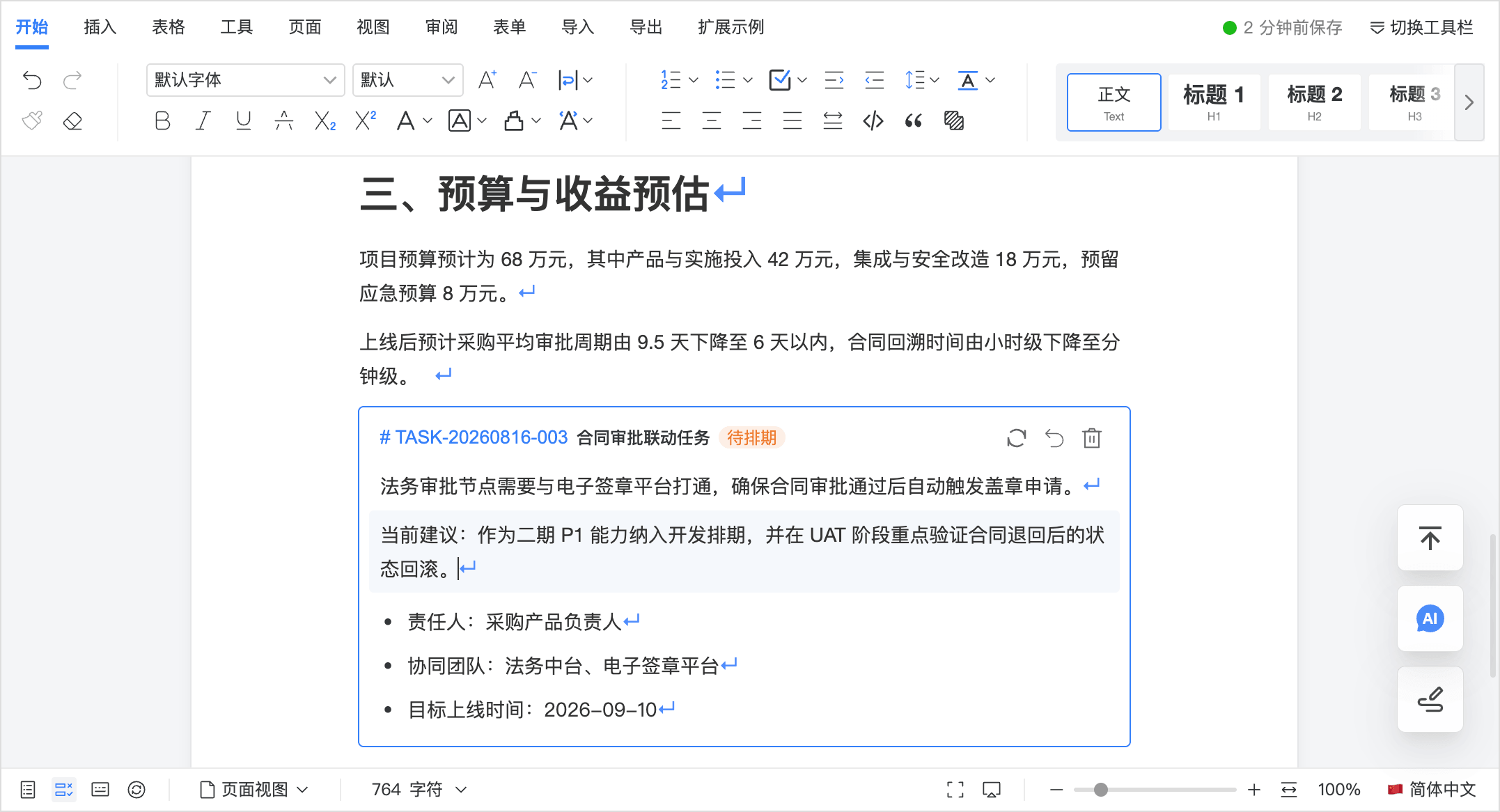
Compared with a normal paragraph, a Business Block works more like a “business container inside the document”:
- it can still contain any rich-text content;
- its header can show a business identifier, name, and status;
- it supports refreshing business info, opening business details, deleting, and rolling back to a normal node;
- it can sync its content to external systems at
bind / update / blur / savetrigger points.
Screenshot
Use Cases
Business Block is well suited to bridge “document editing + business workflow”.
- Approval workflow units: convert approval notes, decisions, or clause conclusions in a document into Business Blocks linked to approval forms, workflow instances, or external tasks.
- Risk control and issue tracking: extract risk descriptions, issue findings, and remediation suggestions into Business Blocks that can be synced to risk systems, ticket systems, or remediation ledgers.
- Contract and policy clause management: elevate key clauses from the main body into Business Blocks, then associate them with clause libraries, legal reviews, clause statuses, or version information.
- Task and action tracking: convert action items from meeting minutes or solution documents into Business Blocks so external systems can generate tasks, owners, due dates, and statuses.
- Knowledge curation: consolidate definitions, standards, conclusions, and best practices from the document body into Business Blocks and sync them into a knowledge base or rule base.
- Structured collection and archiving: preserve the normal writing experience while syncing key paragraphs as Business Blocks to archive systems, ledgers, or master-data systems.
- AI processing units: send a specific Business Block to an external service for extraction, classification, validation, or summary generation, then write the result back to node attributes.
Works Well With
Template Management (template)
- Preconfigure Business Block areas inside templates, then let business users fill and sync them to external systems: Template Management
Content Locking (locked)
- Lock the template skeleton and keep only Business Block areas editable to prevent accidental structural changes: Content Locking
Document Forms (form)
- Forms handle structured fields, while Business Blocks carry long-form business units. They work well together for complex approvals, reports, and operational documents: Document Forms
Track Changes / Comments / Collaboration
- Comments are good for discussion, Track Changes is good for audit trail, and Business Blocks are good for final business units. Together they fit enterprise review and finalization workflows well: Track Changes, Comments, Collaborative Editing
Interaction Rules
- Without selection: insert an empty
biz-block - With selection: elevate the current selection into a
biz-block - Convert full blocks only: if only part of a paragraph is selected, the editor still converts the whole block node instead of splitting the paragraph
- Header area: the left side shows
# bizId name, and status is shown only whenstatusis provided; the right side provides refresh, rollback, and delete actions - Focus highlight: the node shows an outer highlight border when focused
The internal id of a Business Block is automatically generated in sequence as
BIZ-001, BIZ-002, and so on. The displayed bizId comes from
the external business system and can be filled later.
Configuration Example
const defaultOptions = {
  bizBlock: {
    enabled: true,
    types: [
      { label: "Approval Item", value: "approval" },
      { label: "Risk Item", value: "risk" },
      { label: "Task Item", value: "task" },
    ],
    triggers: ["bind", "update", "blur", "save"],
  },

  async onGetBizInfo(attrs) {
    return {
      bizId: "AP-20260816-001",
      status: {
        value: "running",
        label: "In Progress",
        color: "#0052d9",
      },
      meta: {
        owner: "Shared Finance Center",
      },
    };
  },

  async onGetBizBlock(block) {
    console.log("sync biz block", block);
  },

  async onOpenBizBlock(block) {
    console.log("open biz block", block);
  },

  async onDeleteBizBlock(block) {
    console.log("delete biz block", block);
  },
};
Configuration Reference
bizBlock.enabled
Description: Whether to enable Business Block capability. When disabled, the extension is not registered and related entries are hidden.
Type: Boolean
Default: false
bizBlock.types
Description: The Business Block type list shown to users when inserting or converting.
Type: Array
Default: []
Example:
[
  { label: "Approval Item", value: "approval" },
  { label: "Risk Item", value: "risk" },
];
When types is empty:
- the type selector is hidden
- the node
typedefaults to'default'
bizBlock.triggers
Description: Controls when the rich-text content inside Business Blocks is synced to external systems.
Type: Array
Default: []
Available values:
bind: sync immediately after creating or converting into abiz-blockupdate: sync when Business Block content changes, with debounceblur: sync when the editor loses focussave: sync before saving the document
Callback Reference
onGetBizInfo
Description: Fetches or refreshes business information for a Business Block. It is called when the user clicks the refresh button in the node header. It is also called once automatically after node creation if a bizId already exists, so the latest business info can be loaded.
Type: Async Function
Parameters: current node attrs
{
  id,
  name,
  type,
  bizId,
  status,
  meta,
}Returns: an object that can be written back to node attributes. Typical fields include:
bizIdstatusmeta
status is optional. If it is not provided, the node header does not show status.
status is an object:
{
  value: 'running',
  label: 'In Progress',
  color: '#0052d9',
}
onGetBizBlock
Description: Syncs the rich-text content of a Business Block to external systems at the configured trigger points. This is useful for archiving, saving, structured extraction, and workflow synchronization.
Type: Async Function
Parameters:
{
  id,
  trigger,
  attrs,
  content: { html, json, text },
}
Where:
trigger:bind | update | blur | save | manualattrs: current node attributescontent: current rich-text content inside the Business Block
onOpenBizBlock
Description: Triggered when clicking # bizId in the node header. This is suitable for opening a detail page, showing a business card, or launching a side panel.
Type: Async Function
Parameters: same as onGetBizBlock, except trigger is always open.
onDeleteBizBlock
Description: Triggered when the user deletes a biz-block or rolls it back to a normal node. This is useful for business-side cleanup, unbinding, or logging.
Type: Async Function
Parameters: same as onGetBizBlock.
trigger:
delete: the user deletes the node directlyrollback: the user rolls the node back to a normal node
Methods
For method call patterns, see Methods.
setBizBlock
Description: Insert or convert a Business Block. With selection, it converts; without selection, it inserts.
Parameters: attrs (optional)
idnametypebizIdstatusmeta
Returns: Promise<Boolean>
getBizBlock
Description: Gets the node information and content payload of a specific Business Block.
Parameters:
id: internal Business Block node ID
Returns:
{
  id,
  pos,
  attrs,
  node,
  content: { html, json, text },
}
getBizBlocks
Description: Gets all Business Block nodes in the current document.
Parameters: none
Returns: Array
updateBizBlock
Description: Updates a specific Business Block. Business-side attribute writeback, reverse content sync, and manual content sync are all unified under this method.
Parameters:
{
  id,
  attrs,
  content,
  sync,
  trigger,
  silent,
}
Where:
id: internal Business Block node IDattrs: optional attribute patch, typically used forbizId / status / metacontent: optional content update, supports:content: { html, json, text }returned bygetBizBlock- direct
htmlstring - direct
jsoncontent
sync: optional, whether to triggeronGetBizBlockimmediately after local update, defaultfalsetrigger: optional trigger name passed toonGetBizBlock, defaultmanualsilent: optional, whether to suppress sync errors, defaulttrue
When content contains json / html / text at the same time, json takes priority.
Returns: Promise<Boolean>
refreshBizBlock
Description: Actively refreshes the business info of a specific Business Block by calling onGetBizInfo.
Parameters:
id: internal Business Block node ID
Returns: Promise<Boolean>
openBizBlock
Description: Actively triggers the Business Block open action by calling onOpenBizBlock.
Parameters:
id: internal Business Block node ID
Returns: Promise<Boolean>
deleteBizBlock
Description: Deletes a specific Business Block node and triggers onDeleteBizBlock.
Parameters:
id: internal Business Block node ID
Returns: Boolean
rollbackBizBlock
Description: Rolls a Business Block back to a normal node, keeps its inner body content, and triggers onDeleteBizBlock.
Parameters:
id: internal Business Block node ID
Returns: Boolean
Integration Suggestions
If you plan to adopt biz-block in an enterprise system, the following responsibility boundary is recommended:
-
The editor is responsible for:
- inserting, converting, displaying, editing, and triggering sync for nodes
- organizing Business Block content into a unified payload
-
The business system is responsible for:
- generating or filling back
bizId - maintaining status transitions, permissions, routing targets, and business details
- handling business actions inside
onGetBizInfo / onGetBizBlock / onOpenBizBlock / onDeleteBizBlock
- generating or filling back
-
Recommended rollout path:
- enable
bizBlock.enabledfirst - start only with
onGetBizInfoandonOpenBizBlock - enable
bizBlock.triggersafter the business flow stabilizes - finally connect
onDeleteBizBlockinto cleanup or archival processes
- enable
If your business system uses bizId as the only primary key, do not mix the internal
node id with external bizId. Treat the internal id as the
editor node identifier, and bizId as the business primary key.